Hello 서블릿
2024. 8. 24. 07:55ㆍSpring 백엔드 핵심 기술/servlet
스프링 부트 환경에서 서블릿을 등록하고 실행해보자.
참고 > 서블릿은 톰캣 같은 웹 애플리케이션 서버를 직접 설치하고,그 위에 서블릿 코드를 클래스 파일로 빌드해서 올린 다음, 톰캣 서버를 실행하면 된다. 하지만 이 과정은 매우 번거롭다. > 스프링 부트는 톰캣 서버를 내장하고 있으므로, 톰캣 서버 설치 없이 편리하게 서블릿 코드를 실행할 수 있다.
@ServletComponentScan스프링 부트는 서블릿을 직접 등록해서 사용할 수 있도록 @ServletComponentScan을 지원한다.
HelloServlet
package hello.servlet.basic;

import jakarta.servlet.ServletException;
import jakarta.servlet.annotation.WebServlet;
import jakarta.servlet.http.HttpServlet;
import jakarta.servlet.http.HttpServletRequest;
import jakarta.servlet.http.HttpServletResponse;

import java.io.IOException;

@WebServlet(name = "helloServlet", urlPatterns = "/hello")
public class HelloServlet extends HttpServlet {
    @Override
    protected void service(HttpServletRequest req, HttpServletResponse resp) throws ServletException, IOException {
        System.out.println("HelloServlet.service");
        System.out.println("req = " + req);
        System.out.println("resp = " + resp);

        String username = req.getParameter("username");
        System.out.println("username = " + username);

        resp.setContentType("text/plain");//header정보에 들어감
        resp.setCharacterEncoding("utf-8");//header정보에 들어감
        resp.getWriter().write("hello"+username); //단순 html로 화면에 출력해줌
    }
}- @WebServlet
- name = 서블릿 이름
- urlPattern = URL 매핑
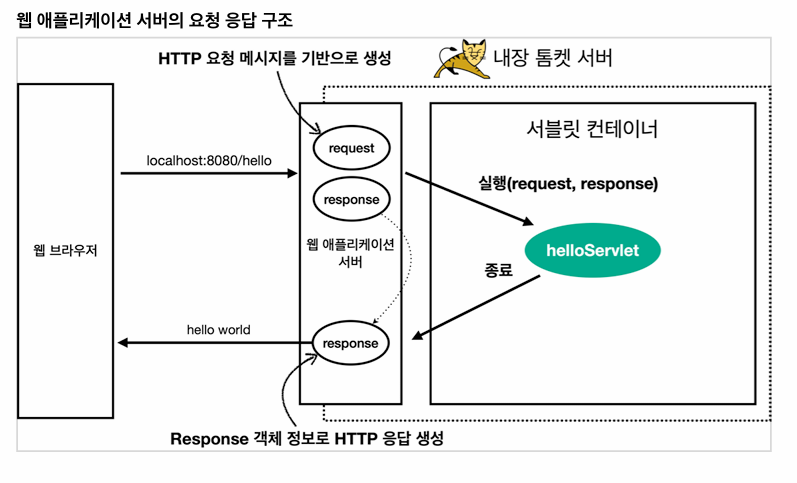
- Http 요청을 통해 매핑된 URL이 호출되면 서블릿 컨테이너는 다음과 같은 메서드를 실행한다.
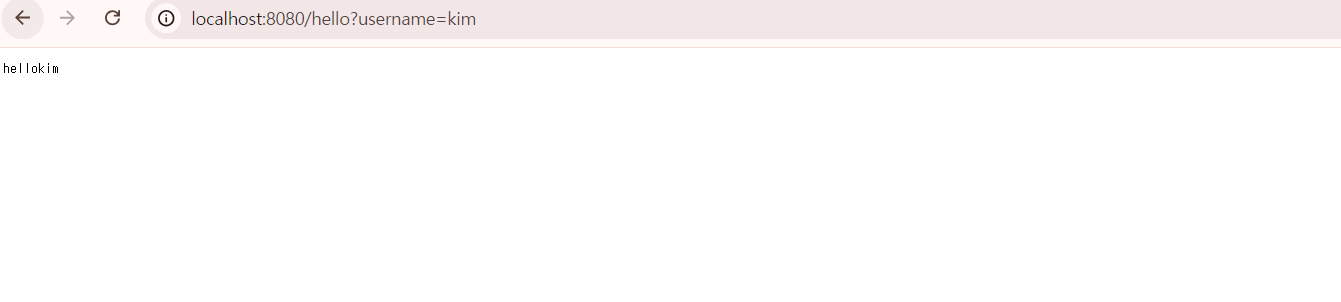
protected void service(HttpServletRequest req, HttpServletResponse resp) throws ServletException, IOException- 웹 브라우저 실행시 다음과 같은 화면이 출력 됨
'Spring 백엔드 핵심 기술 > servlet' 카테고리의 다른 글
| HTTP 응답 데이터 - 단순 텍스트, HTML (0) | 2024.08.26 |
|---|---|
| HTTP 요청 데이터 -API 메시지 바디 - 단순 텍스트 (0) | 2024.08.24 |
| HTTP 요청 데이터 - GET 쿼리 파라미터 (0) | 2024.08.24 |
| HttpServletRequest - 개요2 (0) | 2024.08.24 |
| HttpServletRequest - 개요 (0) | 2024.08.24 |